Every community event (Data.SQL.Saturday.LA event is not an exception here) organizer has a guessing game on topic popularity. Every event planning involves a combination of “I think the majority of attendees would attend a Power BI session” with “Who are the best speakers on Power BI”. This is just an example of course, but hopefully you see the problem.
We have decided to reduce the guessing and allow prospective attendees to define their desired content. Take a poll and help us out.
Unfortunately, our attempt to shift from PayPal to Stripe ended up with paying extra for things that were included in PayPal. Lesson learned. Going forward, we will thoroughly test out the entire offer. While additional spending resulted in just $10-$20 payed for the luxury of using Stripe invoicing, we are extremely frugal with non-profit funds.
We are officially back on a PayPal train, changing all the Stripe references back to PayPal.
Running virtual meetings while recording is tiresome. Planning and marketing virtual meetings, as well as producing video content from those recorded meetings, and above all delivering could be quite overwhelming. The secret sauce to make meeting delivery easier is to use a rinse-and-repeat technique.
Problem
While the main problem is delivering meetings, the major pain point of that problem is delivering those meetings efficiently and consistently. Repeating the same steps using a script is the only way to tackle it. A well-designed PowerPoint slide deck with meeting notes that you can repeat every time is all you need.
What you would need here is to identify what are the commonly used sentences and phrases, write this script into slide deck notes, and just repeat that script by reading it every time while perfecting it.
Solution
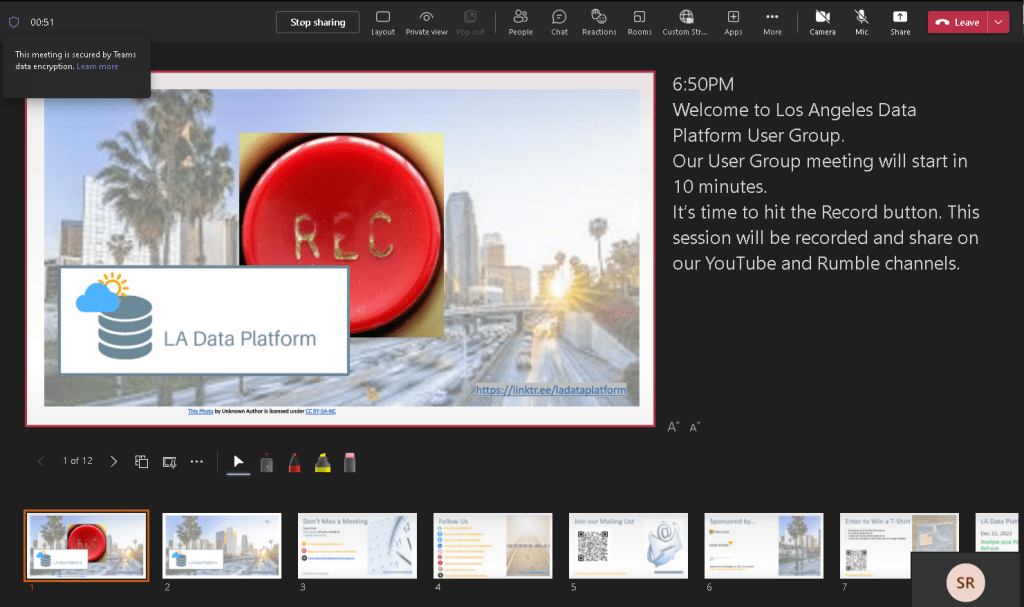
Introducing LA Data Platform PowerPoint (“PPT”) slide deck. The following PPT slide deck includes the script as a slide note to make your virtual meeting more consistent, repeatable, and predictable.
We are officially moving our non-profit credit card processing operations from PayPal to Stripe. This change will be finalized by January 31, 2023.
While we will still keep PayPal around for a few months as a backup, our official platform for collecting donations has been moved to Stripe. All the money inflow links are now pointing to Stripe.
We started to use PayPal years ago to collect donations for 2019 SQL.Saturday.LA event which was really easy and convenient. It all started with getting an IRS letter of determination. 2019 was the same year that we officially became a non-profit, opened a bank account, and set up our PayPal account.
Luckily in 2022, we have options. Some of the benefits of Stripe are automatic bank deposits, the same non-profit discounted rate (2.2% + $0.30 per transaction), quicker customer service, and better User Agreement/Terms of Use/Business Policy. The only thing that Stripe is missing is a Paypal.me.
This is a report of Data Driven Technologies, Inc finances for 2022.
Data Driven Technologies, Inc. (from here and on will be referred to as DDT) is a public US charity recognized under the IRS 501.c.3 code. Our board of directors is composed of various community members and makes all decisions about how the corporation is run.
Balances
Our current finances look like this (all numbers in US dollars).
Assets
We hold $17,258.69 in our bank account at this time.
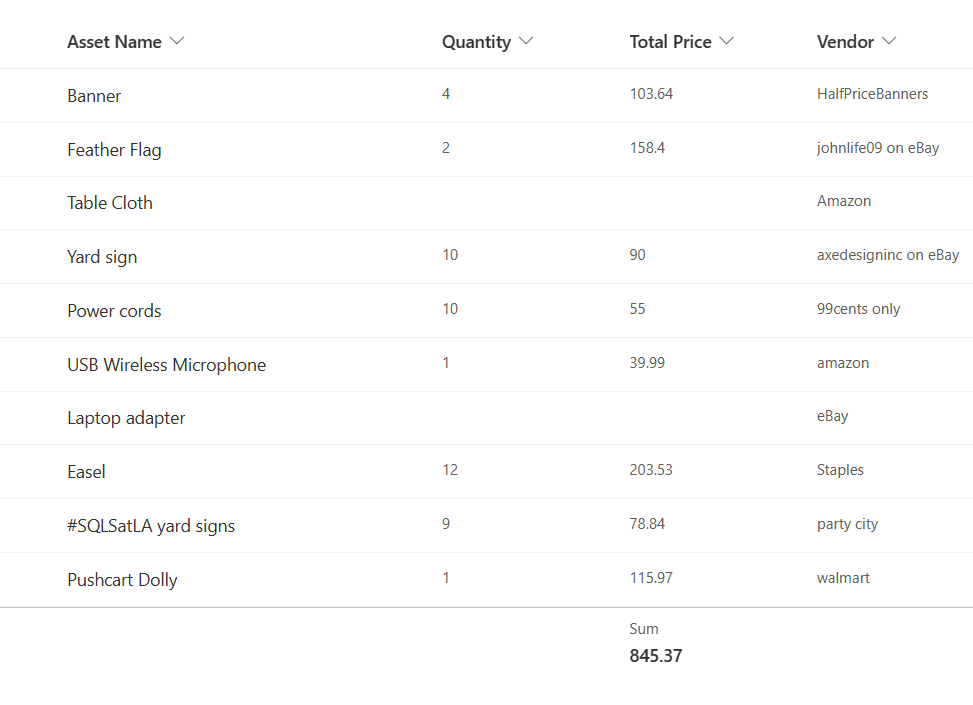
Hard assets – various event-related materials – $845.37 (see Fig #1)
Fig #1
Liabilities
At this time, we have no liabilities.
We have no other debts owed.
Income and Outflows
We began 2022 with $17,330.93 in the bank. We are ending 2022 with assets of $17,258.69.
We had an income in 2022 from any source. Our expenditures were:
$67 for domain registration and hosting
$25 for CA DOJ charity filling (eGov Registry)
$244.78 for LA Data Platform User Group t-shirts (monthly meeting raffle)
$6,703.26 for 2022 Data.SQL.Saturday.LA event (aka SQL Saturday in Los Angeles)
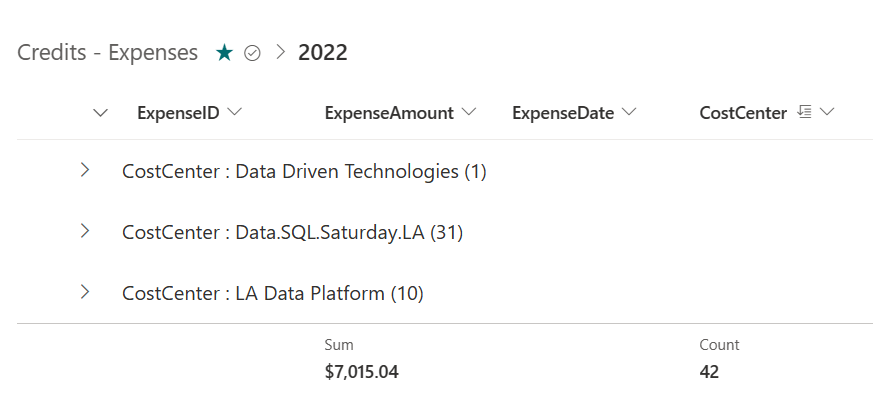
This is a total of : $7,015.04 (see Fig #2)
Fig #2
Sponsorships
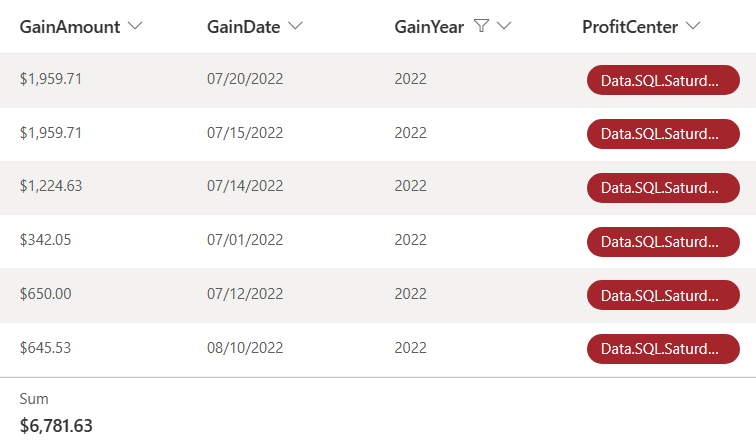
2022 Data.SQL.Saturday.LA event sponsorship generated a total income of $6,781.63 (see Fig #3)
Fig #3
Infrastructure Costs
Our infrastructure costs have been about $67 so far. We have done the following:
Microsoft 365 – as a non-profit, we have a free Office 365 account for collaboration, storage, and other tools.
Union Bank – As a non-profit, we have free banking, and to date, have not incurred any transaction charges.
WordPress – We use this for hosting datadriventechnologies.org website, the blog, and other information regarding our non-profit.
Meetup – funded by Microsoft to host and organize meetings for LA Data Platform User Group
That’s it. We’re not wasting money where we don’t need to do so.
Labor Costs
DDT runs on volunteer efforts and no individual is paid for their time.
Questions or Comments
This report was compiled by Steve Rezhener, President of DDT with cooperation and oversight by Elaena Bakman, VP and CFO of DDT.
If you have any questions or comments on the state of the finances for Data Driven Technologies, Inc., please contact us at admin@datadriventechnologies.org
Introducing 2 new team members. Welcome Thimantha Vidanagamage and welcome Brodie Brickey.
We would like to welcome 2 new members to the Data Driven Technologies, Inc Team:
Thimantha – Thimantha helped us to deliver the first ever LA Data Platform User Group meeting that was live streamed to the world outside of MS Teams. During our 2022 January User Group meeting, we added a live stream to Facebook Live (using OBS Studio, Restream.io, and Facebook) in addition to running our meeting using MS Teams.
Brodie – Brodie volunteered and helped us to successfully deliver 3 SQL Saturday in Los Angeles events. During 2021 SQL Saturday in Los Angeles event, Brodie stepped up and took over building a schedule and session abstract moderation (using Sessionize).
Thimantha Vidanagamage
Thimantha is Data & AI Consultant, Microsoft Certified Azure Data Scientist – Azure AI Engineer – Data Analyst. He will help us craft our video content strategy and take our digital content to a new level.
Brodie is Data Solutions Architect and Consultant at Eagle Peak Group. He will help us to curate everything session related – session abstracts, speaker bio, and slide decks.
Have you attended LA Data Platform User Group meeting and/or our annual SQL Saturday in Los Angeles event? Give us feedback and get stickers!
Introducing LA Data Platform and SQL Saturday in Los Angeles stickers in exchange for feedback. Please use the hyperlink or QR code below to provide us with your feedback.
We would like to welcome a new member to the Data Driven Technologies, Inc Team – Maria Lopez. Maria volunteered and helped us to successfully deliver 2 SQL Saturday in Los Angeles events (2019 and 2021).
Maria will assume a Director of Digital Marketing position and will lead us to new heights.
Maria (Mima) Lopez, a.k.a. Mima is a Systems Administrator & Founder of Mimz Techritory
I am a Systems Administrator and a technology enthusiast from LA. I am one of the leaders of Long Beach Women in Tech, a Tech Instructor for Brown Girls Code and the founder of Mimz Techritory.
Mimz Techritory is my way of broadcasting my IT portfolio and tech interests to the world! Here I publish technical projects I am working on, applications and gadgets I am building and tech events I attend throughout the year. I have a passion for learning and I create content to share my knowledge and tech excitement!
Microsoft 365 subscription. Whenever you have a paid Microsoft 365 subscription or free via a Microsoft for Nonprofit program, there is small, but handy feature that you might want to enable. This blog post is going to talk about how to enable dial-in option for your MS Teams.
Let’s assume that you already setup your Microsoft 365 subscription (BTW, Microsoft did a fantastic job in making it super easy) that gives you an access to the entire Office Apps suite. You can now enjoy all the Office products including a very popular Microsoft Teams (“MS Teams”) online communication and team collaboration tool. MS Teams provides a very potent replacement to Skype for Business enhanced by adding collaboration with OneDrive, SharePoint, Forms as well as other Microsoft tools. Essentially, MS Teams allow you to chat, call, collaborate and much more making it more not just a product, but rather a productivity platform. It’s like having Slack, Zoom, and more all-in-one place.
Fig #1
Problem
While MS Teams best experience comes with Windows/MacOS desktop and/or iOS/Android mobile apps, you can also enjoy it within the browser. Both browser and app will allow you to have audio and video using the power of the Internet, but what if I you have a bad Internet connection or let’s say you are driving, but still want to hear and enjoy the conversation? In that case, you will be looking for an old tech – a dial-in phone number that you can call-in. Unfortunately, Microsoft 365 doesn’t have that option enabled by default.
Solution
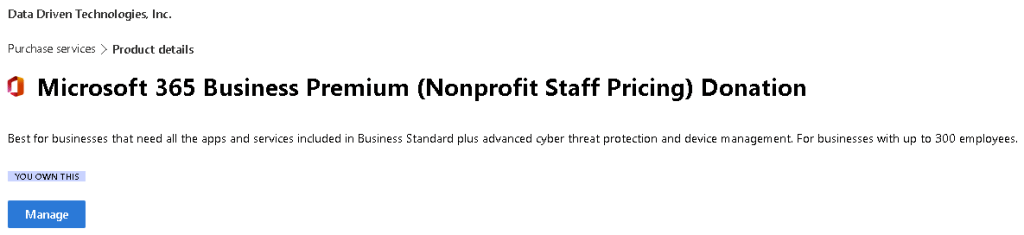
All you need to do is to enable Microsoft 365 Audio Conferencing Adoption (Fig #2). Audio Conferencing is effectively an add-on to existing MS Teams that will add a dial-in phone number option.
Fig #2
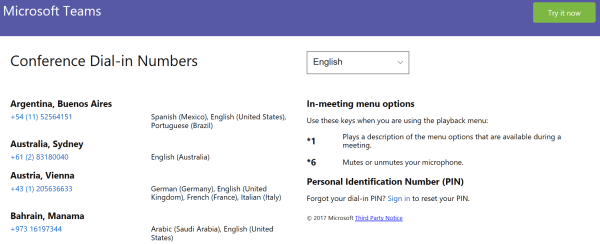
Once Microsoft 365 Audio Conference is on, MS Teams meeting info will change and now include all the dial-in information (Fig #3).
Today is the last day to stay connected with LA Data Platform and SQL Saturday in Los Angeles. PASS is ceasing it’s all regular operations, effective today, January 15, 2021.
The many ways we can stay connected:
Follow #LADataPlatform / #SQLSatLA on social medial channels (Facebook/Twitter/Instagram/LinkedIn/YouTube)
















 Data Driven Technologies (DDT)